Tools
首页
画图
音乐
视频
采集
记事
博客
实验室
登录
lypeng
146
文章
11
分类
49
记事
分类
生活-[23]
Linux-[24]
前端-[9]
数据库-[16]
PHP-[31]
git-[7]
其他-[6]
python-[20]
算法-[4]
React-Native-[4]
中草药-[2]
广告位1
广告位2
首页
/ Linux
返回列表
怎么让URL执行一个shell脚本?
阅读:1094
发布:2018-04-04
作者:lypeng
# 怎么让URL执行一个shell脚本。 这里分Apache与nginx两部分说明。其实这个问题可以扩大为:怎么让URL执行一个CGI程序? 什么是CGI与CGI程序? > 具体参见:https://blog.csdn.net/JAVA_SanXin/article/details/51496688?_blank > CGI其实是一个接口规范,并且按照CGI接口规范开发的程序都可以叫做CGI程序。 > 那么可以用来开发CGI的程序有哪些呢?C、Java、PHP、Perl、Asp、.Net等。 > 用Perl编写的CGI程序后缀为:.pl;Python编写的CGI程序后缀为:.py;而C编写的CGI程序后缀为:.cgi,如果在win下编译出来的是.exe,最好将它重命名为.cgi。 > 这些都是为了HTTP服务能够识别并调用它们 这里主要说shell脚本。 问题总结:即我在网站文件中写一个t.sh脚本(内容如下),怎么通过:`http://www.test.com/t.sh` 形式显示到页面上! ```bash #!/bin/bash echo 'hello world' ``` 问题描述完毕,来说解决方案~ -------- # Apache部分 相对容易些,已经有了写好的模块。 ## 开启模块,修改httpd.conf文件 `LoadModule cgid_module modules/mod_cgid.so` ## 把shell脚本放到这个目录就可以执行了~ `/usr/local/apache/cgi-bin` 自带的test-cgi 可以加后缀.sh或者.cgi,浏览器执行即可 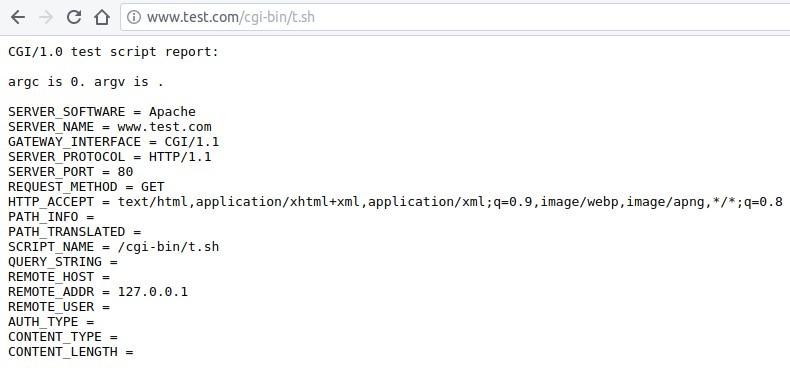 注解:当遇到cgi-bin的时候,由于httpd.conf配置文件中有个alias别名定义,会自动定位到/usr/local/apache/cgi-bin目录中寻找你的脚本文件,而不是你的test.com网站目录中。 ```bash <IfModule alias_module> ScriptAlias /cgi-bin/ "/usr/local/apache/cgi-bin/" </IfModule> # # 对应的cgi-bin的目录配置部分如下,不需要改动 # "/usr/local/apache/cgi-bin" should be changed to whatever your ScriptAliased # CGI directory exists, if you have that configured. # <Directory "/usr/local/apache/cgi-bin"> AllowOverride All Options None Require all granted </Directory> ``` ------------------ # nginx部分 既然nginx可以把PHP文件通过fastcgi转发给9000端口,那么是否也可以把cgi/sh后缀的转发给一个shell的处理器~ 转发工具有了,转发给谁?这个处理器去哪儿找?百度一下,找到:fcgiwrap 官网地址:https://www.nginx.com/resources/wiki/start/topics/examples/fcgiwrap/?_blank ``` # 2019-04-28 # centos操作 # 安装后,新增/etc/init.d/fcgiwrap文件,内容如下 #!/usr/bin/perl use strict; use warnings FATAL => qw( all ); use IO::Socket::UNIX; my $bin_path = '/usr/local/sbin/fcgiwrap'; my $socket_path = $ARGV[0] || '/tmp/fcgiwrap.sock'; my $num_children = $ARGV[1] || 1; close STDIN; unlink $socket_path; my $socket = IO::Socket::UNIX->new( Local => $socket_path, Listen => 9003, ); die "Cannot create socket at $socket_path: $!\n" unless $socket; for (1 .. $num_children) { my $pid = fork; die "Cannot fork: $!" unless defined $pid; next if $pid; exec $bin_path; die "Failed to exec $bin_path: $!\n"; } #使用 /etc/init.d/fcgiwrap start 启动 ``` 下面使用apt-get方式安装,编译安装方式其实结果一样~ ```bash apt-get install fcgiwrap # cp /usr/share/doc/fcgiwrap/examples/nginx.conf /etc/nginx/fcgiwrap.conf # include /etc/nginx/fcgiwrap.conf; # cp与include这两步都不需要,直接在nginx的server中手动配置 /etc/init.d/fcgiwrap start # fcgiwrap这个脚本如果是apt-get安装的,则已经写好了,直接start启动,后面还可以跟stop/restart/status # 执行后,显示内容如下: [ ok ] Starting fcgiwrap (via systemctl): fcgiwrap.service. # 看到OK,我开始还以为启动成功了! /etc/init.d/fcgiwrap status #检查状态,一直是fail失败 # 反应过来,需要使用systemctl命令启动 systemctl start fcgiwrap #查看启动状态 systemctl status fcgiwrap #启动成功后,会生成一个socket文件,在/var/run/fcgiwrap.socket ps aux | grep fcgiwrap #查看进程是否存在,并且注意是以什么用户身份运行的 #OK,到这里基本上就算完成80%了,剩下配置server了 #你可以匹配网站的/cgi-bin目录,也可以匹配.cgi或.sh或.pl后缀 location /cgi-bin/ { gzip off; fastcgi_pass unix:/var/run/fcgiwrap.socket; #转发到socket处理CGI fastcgi_index index.cgi; #同PHP,可以定义一个默认首页 include fastcgi_params; #包含fastcgi相关参数 fastcgi_param SCRIPT_FILENAME /home/wwwroot/test$fastcgi_script_name; #定义脚本文件 } # 或者如下 location ~ \.(cgi|sh)(.*)$ { gzip off; fastcgi_pass unix:/var/run/fcgiwrap.socket; fastcgi_index index.cgi; include fastcgi_params; fastcgi_param SCRIPT_FILENAME /home/wwwroot/test$fastcgi_script_name; } ``` 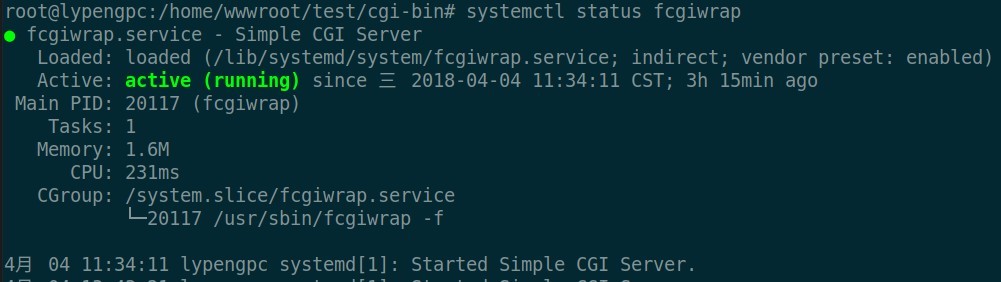  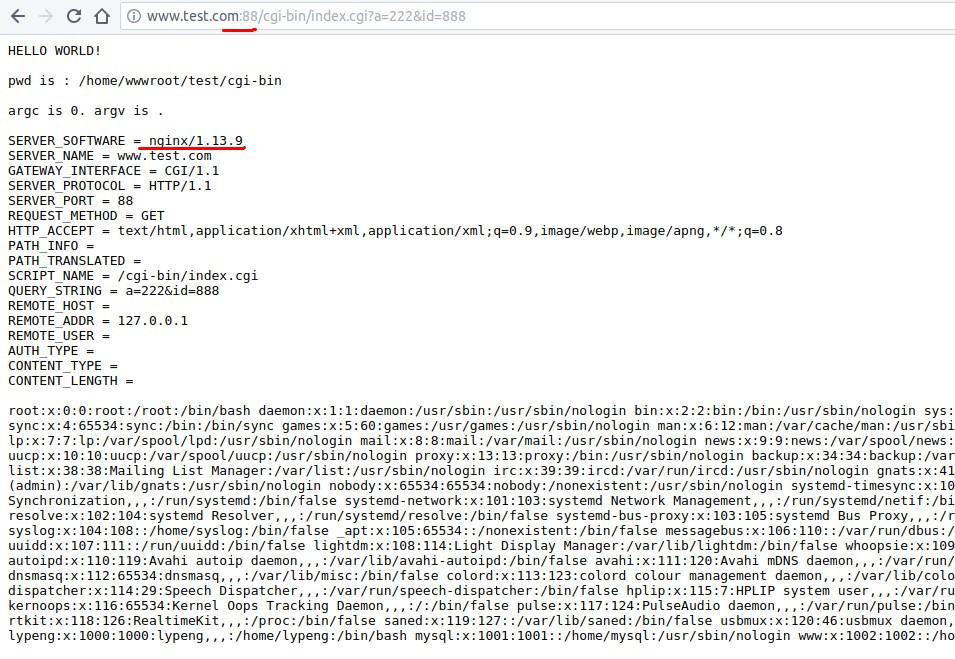 ## 遇到的错误,主要是502与403 ### 502错误一,具体原因查看日志吧,`vim /usr/local/nginx/logs/error.log` 不能连接fcgiwrap.socket,连接拒绝! > 2018/04/04 11:10:42 [error] 16335#0: *45 connect() to unix:/var/run/fcgiwrap.socket failed (111: Connection refused) while connecting to upstream, client: 127.0.0.1, server: www.test.com, request: "GET /cgi-bin/t.cgi HTTP/1.1", upstream: "fastcgi://unix:/var/run/fcgiwrap.socket:", host: "www.test.com:88" #### 解决: 1. 查看fcgiwrap.socket文件是否存在 `ll /run/` 2. 查看fcgiwrap服务是否运行 `systemctl status fcgiwrap` 3. 检查运行的用户是否一致,我这里统一使用www用户 a.修改nginx.conf,最上边,user www; b.修改/lib/systemd/system/fcgiwrap.service文件中的,user与group为www,默认用户是www-data,而我系统中,没有www-data,所以会启动失败 ```bash [Unit] Description=Simple CGI Server After=nss-user-lookup.target Requires=fcgiwrap.socket [Service] Environment=DAEMON_OPTS=-f EnvironmentFile=-/etc/default/fcgiwrap ExecStart=/usr/sbin/fcgiwrap ${DAEMON_OPTS} User=www Group=www [Install] Also=fcgiwrap.socket ``` 修改后重载服务 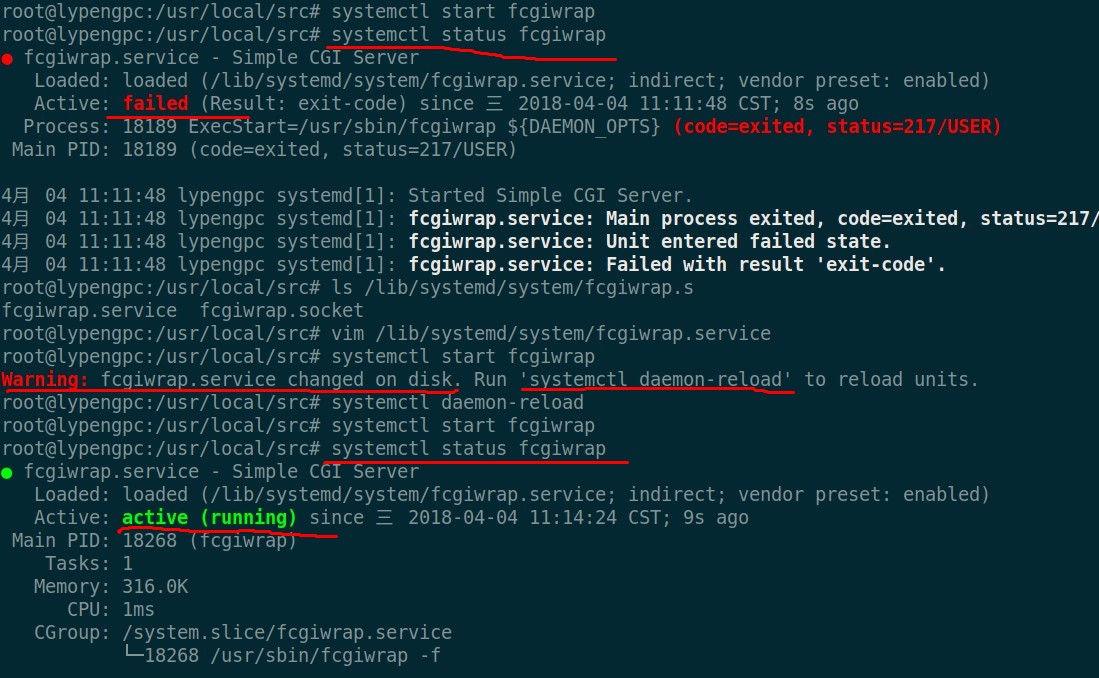 ### 502错误二,from upstream 读取header信息时,输出被关闭 > 2018/04/04 11:27:02 [error] 18375#0: *62 upstream prematurely closed FastCGI stdout while reading response header from upstream, client: 127.0.0.1, server: www.test.com, request: "GET /cgi-bin /index.cgi HTTP/1.1", upstream: "fastcgi://unix:/var/run/fcgiwrap.socket:", host: "www.test.com: 88" #### 解决: 应该是输出内容的形式未定义,需要在文件头部增加`echo "Content-type: text/plain; charset=iso-8859-1"`(来自Apache的默认test-cgi文件中) ### 中文乱码 将上面的编码`iso-8859-1` 改为`utf-8`即可 ### 403错误,不能得到脚本名称 > 2018/04/04 11:14:48 [error] 16335#0: *53 FastCGI sent in stderr: "Cannot get script name, are DO CUMENT_ROOT and SCRIPT_NAME (or SCRIPT_FILENAME) set and is the script executable?" while readin g response header from upstream, client: 127.0.0.1, server: www.test.com, request: "GET /cgi-bin /t.cgi HTTP/1.1", upstream: "fastcgi://unix:/var/run/fcgiwrap.socket:", host: "www.test.com:88" #### 解决: 你的nginx配置问题,见附录 或者文件没有执行权限:执行`chmod a+x index.cgi`增加权限 #附录,放一个nginx中的完整配置 ``` server { listen 88; server_name www.test.com; root /home/wwwroot/test; location / { index index.html index.php; } location ~ .*\.(sh|cgi)(.*)$ { include fastcgi_params; fastcgi_pass unix:/tmp/fcgiwrap.socket; fastcgi_index index.cgi; fastcgi_param SCRIPT_FILENAME /home/wwwroot/test$fastcgi_script_name; } location ~ \.php(.*)$ { fastcgi_pass 127.0.0.1:9000; fastcgi_index index.php; set $fileroot /home/wwwroot/test; set $path_info ""; set $real_script_name $fastcgi_script_name; if ($fastcgi_script_name ~ "^(.+?\.php)(/.+)$") { set $real_script_name $1; set $path_info $2; } fastcgi_param PATH_INFO $path_info; fastcgi_param SCRIPT_NAME $real_script_name; fastcgi_param SCRIPT_FILENAME $fileroot$real_script_name; include fastcgi_params; } } ```
------本文结束
感谢阅读------
上一篇:
linux命令之awk
下一篇:
ubuntu解决virtualbox虚拟机中的win7不识别USB设备
 lypeng lypeng