Tools
首页
画图
音乐
视频
采集
记事
博客
实验室
登录
lypeng
146
文章
11
分类
49
记事
分类
生活-[23]
Linux-[24]
前端-[9]
数据库-[16]
PHP-[31]
git-[7]
其他-[6]
python-[20]
算法-[4]
React-Native-[4]
中草药-[2]
广告位1
广告位2
首页
/ React-Native
返回列表
react-native案例(一)调用豆瓣接口写的图书电影APP
阅读:1342
发布:2019-03-12
作者:lypeng
# git地址 ## https://github.com/lypeng29/react-native-book ## 感觉还行的话,给个star鼓励下呗~ ## 断断续续的看视频,敲代码,视频中的是es5的,现在都是es6了;视频中是iOS,而我这里是Android,写的过程中需要注意下~ # react-native-book 基于react-native编写的图书APP,接口来自豆瓣 ## 运行项目 ``` git clone https://github.com/lypeng29/react-native-book.git cd react-native-book yarn install react-native run-android ``` ## 运行效果图  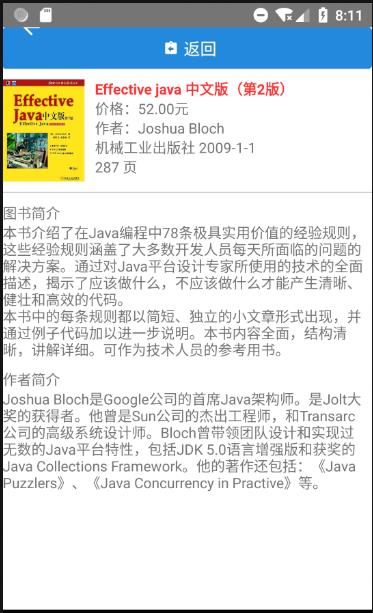   ## 学习课程地址 https://ke.qq.com/webcourse/index.html#cid=203313&term_id=100240778&taid=1278010468801073&vid=e1414ek8gbc ## 欠缺功能 - header导航条:目前影藏了,设置了header高度为0 ## 遇到的问题 ### 1.`preview is unaliveable until after a successful project sync` 解决方案:`https://blog.csdn.net/ancientear/article/details/81091342` ### 2.`unable to load script from assets 'index.android.bundle'` 因版本问题找不到编译后的入口文件,新版都是index.js为入口文件,执行:`react-native bundle --platform android --dev false --entry-file index.js --bundle-output android/app/src/main/assets/index.android.bundle --assets-dest android/app/src/main/res/` ### 3.开启热更新 真机测试需要摇动手机,模拟器的话是menu键(windows: ctrl + M ,macOS: command + M) 设置host:port(例如我的是192.168.1.129:8081) ### 4.title居中问题 设置:`headerTitleStyle:{flex:1,textAlign:'center'}` ### 5.同时显示头部与底部导航条问题(即同时使用createStackNavigator与createBottomTabNavigator) 先使用createBottomTabNavigator创建底部导航,后使用createStackNavigator创建全局导航,把底部导航放进去 具体见main.js文件 ### 6.页面传值问题 传递值:`this.props.navigation.push('Details', { 'bookID': item.id })` 获取值:`this.props.navigation.getParam('bookID', 26378583);` ### 7.A problem occurred configuring project ':app',还提示找不到SDK目录,我的目录是存在的 查看了之前的项目,需要新建local.properties文件,里面写上:`sdk.dir=D\:\\Android\\SDK` ### 8.null is not an object evaluating 'RNGestureHandlerModule.State' 缺少模块,需要安装下: ``` yarn add react-native-gesture-handler react-native link ``` ### 9.RNCWebView was not found in the UIManager ``` yarn add react-native-webview react-native link react-native-webview #安装完成,需要关联下 ``` 关联成功后,需要修改settings.gradle文件中的“\”为“/”,否则路径错误。react-native 0.59已修复
------本文结束
感谢阅读------
上一篇:
react-native使用navigation页面跳转
下一篇:
解决React-native一行两个,一行三个,一行N个布局问题
 lypeng lypeng