Tools
首页
画图
音乐
视频
采集
记事
博客
实验室
登录
lypeng
146
文章
11
分类
49
记事
分类
生活-[23]
Linux-[24]
前端-[9]
数据库-[16]
PHP-[31]
git-[7]
其他-[6]
python-[20]
算法-[4]
React-Native-[4]
中草药-[2]
广告位1
广告位2
首页
/ 数据库
返回列表
Mycat安装与配置入门
阅读:221
发布:2020-03-02
作者:lypeng
一直想体验下MySQL中间件,现在不怎么忙了,折腾下~ 中间件网上查询有很多,最终选择可能是用的最多的mycat~ ## mycat介绍 mycat相当于各个数据库的汇总,一个入口,开发人员只需要连接它,不用管数据是怎么拆分,存储,备份~ 数据可以放在一个或多个服务器,多个数据库,只要定义好规则~ 但如果mycat所在的服务器挂了,那么整个业务也就瘫痪了~ 更多详情见官网:http://mycat.io/?_blank 或github ## 快速体验 参考:https://blog.csdn.net/yu342107056/article/details/88326540?_blank 1. 下载地址:http://dl.mycat.io?_blank ,可以下载linux版,或者Windows版 >下载后解压即可,mycat使用java写的,需要安装JDK,Linux虚拟机的话,内存建议给大点,我给了4G,如果只分配1G,JDK安装过程中会提示内存不足,无法安装! 2. 修改conf文件夹下:server.xml,schema.xml,rule.xml三个文件, 添加student_text.txt规则文件,内容如下: ``` 0-1M=0 1M-2M=1 ``` 3. 配置完成后,win双击startup_nowrap.bat启动 mycat 服务 或 linux: ./mycat start启动 > 从共享文件夹复制到虚拟机的,需要执行dos2unix转换,转换文件末尾的\r\n等等为Linux格式 ``` yum -y install dos2unix dos2unix mycat ``` 4. 本地新建三个数据库,db1,db2,db3,分别建各自对应的表~ 5. 连接mycat 127.0.0.1:8066 root 123456,即看到mydatabase数据库(注意防火墙与端口是否开放) [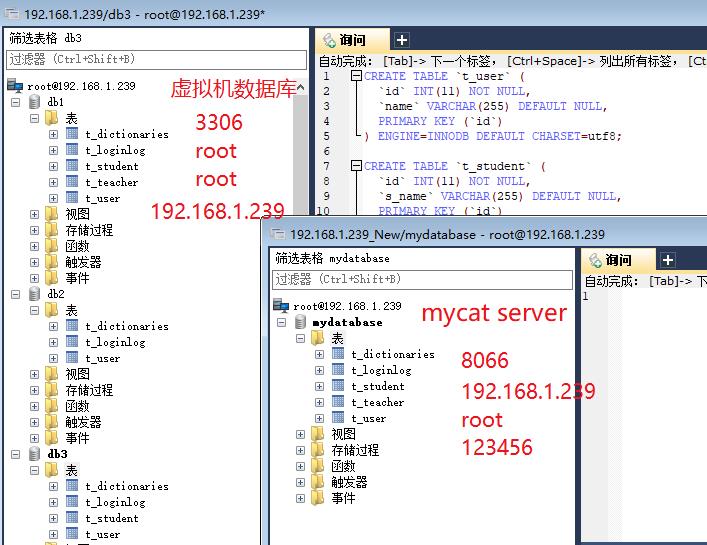](/uploads/lypeng/2020031001.jpg) [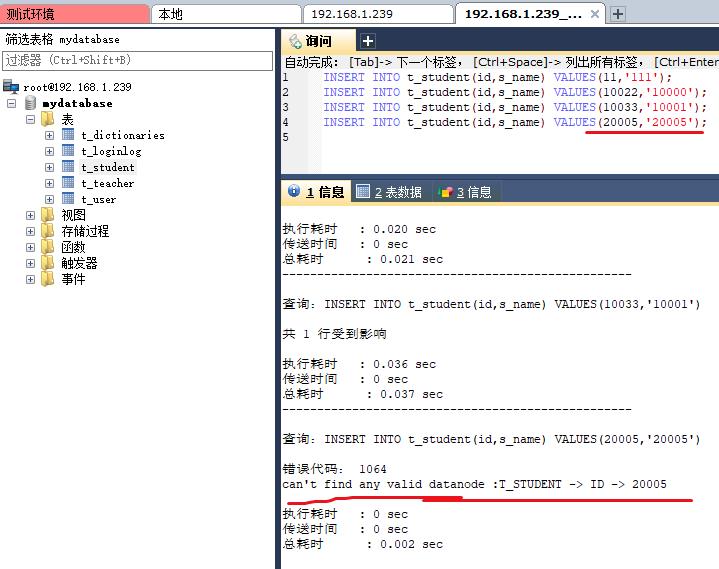](/uploads/lypeng/2020031002.jpg) 可以看到id超过2万,会报错~ ## 规则详解 ``` 常用的分片规则:总共十个(基本够用) 一、枚举法 <tableRule name="sharding-by-intfile"> <rule> <columns>user_id</columns> <algorithm>hash-int</algorithm> </rule> </tableRule> <function name="hash-int" class="io.mycat.route.function.PartitionByFileMap"> <property name="mapFile">partition-hash-int.txt</property> <property name="type">0</property> <property name="defaultNode">0</property> </function> partition-hash-int.txt 配置: 10000=0 10010=1 上面columns 标识将要分片的表字段,algorithm 分片函数, 其中分片函数配置中,mapFile标识配置文件名称,type默认值为0,0表示Integer,非零表示String, 所有的节点配置都是从0开始,及0代表节点1 /** * defaultNode 默认节点:小于0表示不设置默认节点,大于等于0表示设置默认节点,结点为指定的值 * 默认节点的作用:枚举分片时,如果碰到不识别的枚举值,就让它路由到默认节点 * 如果不配置默认节点(defaultNode值小于0表示不配置默认节点),碰到 * 不识别的枚举值就会报错, * like this:can't find datanode for sharding column:column_name val:ffffffff */ 二、固定分片hash算法 <tableRule name="rule1"> <rule> <columns>user_id</columns> <algorithm>func1</algorithm> </rule> </tableRule> <function name="func1" class="io.mycat.route.function.PartitionByLong"> <property name="partitionCount">2,1</property> <property name="partitionLength">256,512</property> </function> 配置说明: 上面columns 标识将要分片的表字段,algorithm 分片函数, partitionCount 分片个数列表,partitionLength 分片范围列表 分区长度:默认为最大2^n=1024 ,即最大支持1024分区 约束 : count,length两个数组的长度必须是一致的。 1024 = sum((count[i]*length[i])). count和length两个向量的点积恒等于1024 用法例子: @Test public void testPartition() { // 本例的分区策略:希望将数据水平分成3份,前两份各占25%,第三份占50%。(故本例非均匀分区) // |<---------------------1024------------------------>| // |<----256--->|<----256--->|<----------512---------->| // | partition0 | partition1 | partition2 | // | 共2份,故count[0]=2 | 共1份,故count[1]=1 | int[] count = new int[] { 2, 1 }; int[] length = new int[] { 256, 512 }; PartitionUtil pu = new PartitionUtil(count, length); // 下面代码演示分别以offerId字段或memberId字段根据上述分区策略拆分的分配结果 int DEFAULT_STR_HEAD_LEN = 8; // cobar默认会配置为此值 long offerId = 12345; String memberId = "qiushuo"; // 若根据offerId分配,partNo1将等于0,即按照上述分区策略,offerId为12345时将会被分配到partition0中 int partNo1 = pu.partition(offerId); // 若根据memberId分配,partNo2将等于2,即按照上述分区策略,memberId为qiushuo时将会被分到partition2中 int partNo2 = pu.partition(memberId, 0, DEFAULT_STR_HEAD_LEN); Assert.assertEquals(0, partNo1); Assert.assertEquals(2, partNo2); } 如果需要平均分配设置:平均分为4分片,partitionCount*partitionLength=1024 <function name="func1" class="org.opencloudb.route.function.PartitionByLong"> <property name="partitionCount">4</property> <property name="partitionLength">256</property> </function> 三、范围约定 <tableRule name="auto-sharding-long"> <rule> <columns>user_id</columns> <algorithm>rang-long</algorithm> </rule> </tableRule> <function name="rang-long" class="io.mycat.route.function.AutoPartitionByLong"> <property name="mapFile">autopartition-long.txt</property> </function> # range start-end ,data node index # K=1000,M=10000. 0-500M=0 500M-1000M=1 1000M-1500M=2 或 0-10000000=0 10000001-20000000=1 配置说明: 上面columns 标识将要分片的表字段,algorithm 分片函数, rang-long 函数中mapFile代表配置文件路径 所有的节点配置都是从0开始,及0代表节点1,此配置非常简单,即预先制定可能的id范围到某个分片 四、求模法 <tableRule name="mod-long"> <rule> <columns>user_id</columns> <algorithm>mod-long</algorithm> </rule> </tableRule> <function name="mod-long" class="io.mycat.route.function.PartitionByMod"> <!-- how many data nodes --> <property name="count">3</property> </function> 配置说明: 上面columns 标识将要分片的表字段,algorithm 分片函数, 此种配置非常明确即根据id与count(你的结点数)进行求模预算,相比方式1,此种在批量插入时需要切换数据源,id不连续 五、日期列分区法 <tableRule name="sharding-by-date"> <rule> <columns>create_time</columns> <algorithm>sharding-by-date</algorithm> </rule> </tableRule> <function name="sharding-by-date" class="io.mycat.route.function..PartitionByDate"> <property name="dateFormat">yyyy-MM-dd</property> <property name="sBeginDate">2014-01-01</property> <property name="sPartionDay">10</property> </function> 配置说明: 上面columns 标识将要分片的表字段,algorithm 分片函数, 配置中配置了开始日期,分区天数,即默认从开始日期算起,分隔10天一个分区 还有一切特性请看源码 Assert.assertEquals(true, 0 == partition.calculate("2014-01-01")); Assert.assertEquals(true, 0 == partition.calculate("2014-01-10")); Assert.assertEquals(true, 1 == partition.calculate("2014-01-11")); Assert.assertEquals(true, 12 == partition.calculate("2014-05-01")); 六、通配取模 <tableRule name="sharding-by-pattern"> <rule> <columns>user_id</columns> <algorithm>sharding-by-pattern</algorithm> </rule> </tableRule> <function name="sharding-by-pattern" class="io.mycat.route.function.PartitionByPattern"> <property name="patternValue">256</property> <property name="defaultNode">2</property> <property name="mapFile">partition-pattern.txt</property> </function> partition-pattern.txt # id partition range start-end ,data node index ###### first host configuration 1-32=0 33-64=1 65-96=2 97-128=3 ######## second host configuration 129-160=4 161-192=5 193-224=6 225-256=7 0-0=7 配置说明: 上面columns 标识将要分片的表字段,algorithm 分片函数,patternValue 即求模基数,defaoultNode 默认节点,如果不配置了默认,则默认是0即第一个结点 mapFile 配置文件路径 配置文件中,1-32 即代表id%256后分布的范围,如果在1-32则在分区1,其他类推,如果id非数字数据,则会分配在defaoultNode 默认节点 String idVal = "0"; Assert.assertEquals(true, 7 == autoPartition.calculate(idVal)); idVal = "45a"; Assert.assertEquals(true, 2 == autoPartition.calculate(idVal)); 七、ASCII码求模通配 <tableRule name="sharding-by-prefixpattern"> <rule> <columns>user_id</columns> <algorithm>sharding-by-prefixpattern</algorithm> </rule> </tableRule> <function name="sharding-by-pattern" class="io.mycat.route.function.PartitionByPrefixPattern"> <property name="patternValue">256</property> <property name="prefixLength">5</property> <property name="mapFile">partition-pattern.txt</property> </function> partition-pattern.txt # range start-end ,data node index # ASCII # 48-57=0-9 # 64、65-90=@、A-Z # 97-122=a-z ###### first host configuration 1-4=0 5-8=1 9-12=2 13-16=3 ###### second host configuration 17-20=4 21-24=5 25-28=6 29-32=7 0-0=7 配置说明: 上面columns 标识将要分片的表字段,algorithm 分片函数,patternValue 即求模基数,prefixLength ASCII 截取的位数 mapFile 配置文件路径 配置文件中,1-32 即代表id%256后分布的范围,如果在1-32则在分区1,其他类推 此种方式类似方式6只不过采取的是将列种获取前prefixLength位列所有ASCII码的和进行求模sum%patternValue ,获取的值,在通配范围内的 即 分片数, /** * ASCII编码: * 48-57=0-9阿拉伯数字 * 64、65-90=@、A-Z * 97-122=a-z * */ 如 String idVal="gf89f9a"; Assert.assertEquals(true, 0==autoPartition.calculate(idVal)); idVal="8df99a"; Assert.assertEquals(true, 4==autoPartition.calculate(idVal)); idVal="8dhdf99a"; Assert.assertEquals(true, 3==autoPartition.calculate(idVal)); 八、编程指定 <tableRule name="sharding-by-substring"> <rule> <columns>user_id</columns> <algorithm>sharding-by-substring</algorithm> </rule> </tableRule> <function name="sharding-by-substring" class="io.mycat.route.function.PartitionDirectBySubString"> <property name="startIndex">0</property> <!-- zero-based --> <property name="size">2</property> <property name="partitionCount">8</property> <property name="defaultPartition">0</property> </function> 配置说明: 上面columns 标识将要分片的表字段,algorithm 分片函数 此方法为直接根据字符子串(必须是数字)计算分区号(由应用传递参数,显式指定分区号)。 例如id=05-100000002 在此配置中代表根据id中从startIndex=0,开始,截取siz=2位数字即05,05就是获取的分区,如果没传默认分配到defaultPartition 九、字符串拆分hash解析 <tableRule name="sharding-by-stringhash"> <rule> <columns>user_id</columns> <algorithm>sharding-by-stringhash</algorithm> </rule> </tableRule> <function name="sharding-by-substring" class="io.mycat.route.function.PartitionByString"> <property name=length>512</property> <!-- zero-based --> <property name="count">2</property> <property name="hashSlice">0:2</property> </function> 配置说明: 上面columns 标识将要分片的表字段,algorithm 分片函数 函数中length代表字符串hash求模基数,count分区数,hashSlice hash预算位 即根据子字符串 hash运算 hashSlice : 0 means str.length(), -1 means str.length()-1 /** * "2" -> (0,2)<br/> * "1:2" -> (1,2)<br/> * "1:" -> (1,0)<br/> * "-1:" -> (-1,0)<br/> * ":-1" -> (0,-1)<br/> * ":" -> (0,0)<br/> */ public class PartitionByStringTest { @Test public void test() { PartitionByString rule = new PartitionByString(); String idVal=null; rule.setPartitionLength("512"); rule.setPartitionCount("2"); rule.init(); rule.setHashSlice("0:2"); // idVal = "0"; // Assert.assertEquals(true, 0 == rule.calculate(idVal)); // idVal = "45a"; // Assert.assertEquals(true, 1 == rule.calculate(idVal)); //last 4 rule = new PartitionByString(); rule.setPartitionLength("512"); rule.setPartitionCount("2"); rule.init(); //last 4 characters rule.setHashSlice("-4:0"); idVal = "aaaabbb0000"; Assert.assertEquals(true, 0 == rule.calculate(idVal)); idVal = "aaaabbb2359"; Assert.assertEquals(true, 0 == rule.calculate(idVal)); } 十、一致性hash <tableRule name="sharding-by-murmur"> <rule> <columns>user_id</columns> <algorithm>murmur</algorithm> </rule> </tableRule> <function name="murmur" class="io.mycat.route.function.PartitionByMurmurHash"> <property name="seed">0</property><!-- 默认是0--> <property name="count">2</property><!-- 要分片的数据库节点数量,必须指定,否则没法分片—> <property name="virtualBucketTimes">160</property><!-- 一个实际的数据库节点被映射为这么多虚拟节点,默认是160倍,也就是虚拟节点数是物理节点数的160倍--> <!-- <property name="weightMapFile">weightMapFile</property> 节点的权重,没有指定权重的节点默认是1。以properties文件的格式填写,以从0开始到count-1的整数值也就是节点索引为key,以节点权重值为值。所有权重值必须是正整数,否则以1代替 --> <!-- <property name="bucketMapPath">/etc/mycat/bucketMapPath</property> 用于测试时观察各物理节点与虚拟节点的分布情况,如果指定了这个属性,会把虚拟节点的murmur hash值与物理节点的映射按行输出到这个文件,没有默认值,如果不指定,就不会输出任何东西 --> </function> ———————————————— 版权声明:本文为CSDN博主「Arno_Yu」的原创文章,遵循 CC 4.0 BY-SA 版权协议,转载请附上原文出处链接及本声明。 原文链接:https://blog.csdn.net/yu342107056/article/details/88326540 ``` ## 原理
------本文结束
感谢阅读------
上一篇:
mysql函数总结
下一篇:
mysql查询结果直接转储到文件txt或者csv
 lypeng lypeng